
The fastest way to teach a developer about a platform isn’t to tell them how it works. It’s to hand them something fun, inspire them, and make them curious.
That’s most of my job in Developer Relations. Build something people want to touch, make it genuinely delightful, and let the technology underneath do the teaching. So when we planned the Cloudflare booth at WeAreDevelopers World Congress in Berlin, I didn’t want a demo you watch. I wanted one you make something with.
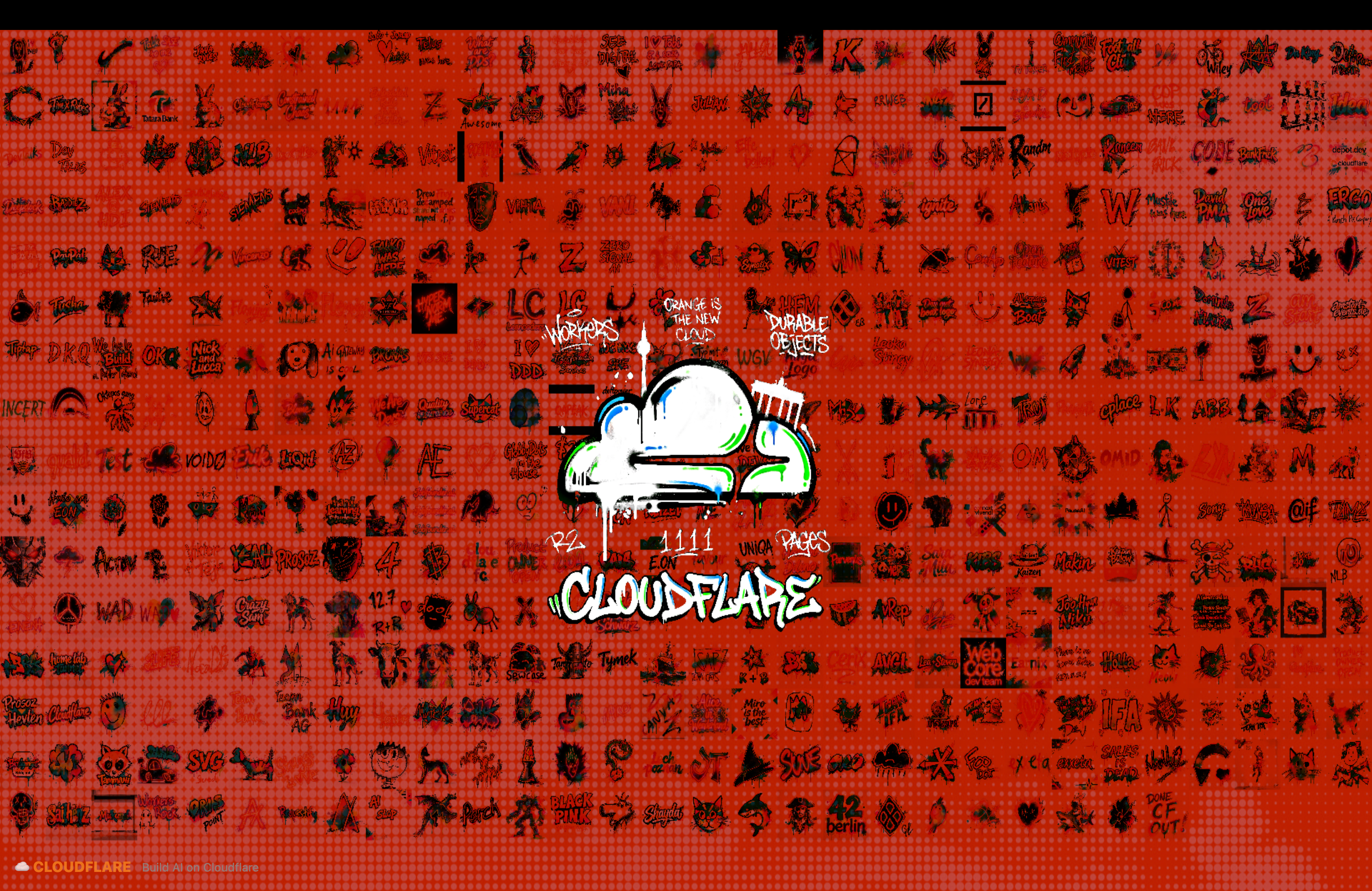
Two iPads. A six-meter LED wall. A thousand visitors over two days. People walked up, sketched something or typed a prompt, and watched their idea turn into graffiti-style art on a massive wall in (almost) real-time, with moderation quietly keeping the wall clean the entire time.
I would be lying if I said the whole idea was mine. The idea was a team effort. I was on a call with our amazing Events Manager where she was talking about a similar-ish idea, but for a different event. Since WeAreDevelopers World Congress was in Berlin, a graffiti wall felt like the perfect fit. Visitors sketch on an iPad, watch it spray onto the wall, and get a QR code to download and share their piece. Over two days, all those individual drawings pile up into one collective mural.
Here’s the thing about a demo like this: it only teaches if it works. A fragile toy that crashes on flaky conference WiFi doesn’t say “Cloudflare is a great place to build”, it says the opposite. So the interesting engineering wasn’t making it pretty. It was making it pretty and impossible to break in a hostile, public environment.
I ended up designing the whole thing around three fears. Let me walk you through them.
The stack, and the three fears
The entire app runs on a single Cloudflare Workers deployment:
- Astro with the Cloudflare adapter for server-rendered pages and API routes
- Cloudflare Agents SDK — a Durable Object backed by SQLite handles all wall state and WebSocket fan-out
- Replicate SDK for image generation (sync mode with a webhook backstop)
- Workers AI for server-side content moderation
- R2 for image and sketch storage
- transformers.js + NSFW.js for client-side moderation pre-filtering on the iPads
The iPads run a drawing canvas in Safari. A separate laptop drives the LED wall by opening a gallery page in fullscreen Chrome, receiving new images over a WebSocket from the Durable Object.
That’s the smallest stack I could get away with. Each piece earns its place by answering one of my three fears:
- The connection drops. Conference WiFi is unreliable, and a dropped request mid-generation shouldn’t lose a visitor’s art, or worse, put it on the wall twice.
- The wall has our name on it. This is a public installation with the Cloudflare brand on it. Offensive content on the wall is not an option.
- It has to survive eight hours a day, twice. Power, network, and thousands of hands, all doing their best to break it.
Fear #1: the connection drops
Picture the failure: A visitor taps the button “Spray It,” the request hits the Worker, Replicate starts generating, and then the iPad’s WiFi blinks out. The iPad retries. Without protection, that’s a duplicate Replicate job and the same piece painted onto the wall twice.
The fix is idempotency. Each submission carries a client-generated UUID as its submissionId. Before calling Replicate, the Worker reserves the submission in the Durable Object:
const inserted = this.sql` INSERT INTO generations (id, status, prompt, kiosk) VALUES (${args.submissionId}, 'pending', ${args.prompt}, ${args.kiosk}) ON CONFLICT(id) DO NOTHING RETURNING id`.length > 0;If the iPad retries with the same submissionId, the ON CONFLICT DO NOTHING makes it a no-op. The Worker returns whatever status the submission already has - pending (still generating), ready (already placed), or blocked (moderation rejected it). No duplicate jobs, no duplicate placements.
The same pattern guards the final placement. When an image is ready, the Durable Object uses a conditional update so only one code path can flip it to ready:
const updated = this.sql`  UPDATE generations  SET status = 'ready', x = ${position.x}, y = ${position.y}, ts = ${timestamp}  WHERE id = ${args.id} AND status IN ('pending', 'failed')`;
const image = this.toWallImage(this.row(args.id));
if (updated.length > 0) {  this.broadcast(JSON.stringify({    type: 'new-image',    id: args.id,    position: image.position,    timestamp,  }));}
Now, why would two code paths ever race to place the same image? Because generation runs on two paths at once. Replicate’s sync mode — replicate.run() with wait: { mode: 'block' } holds the connection open and returns the image in a few seconds. But the same call also registers a webhook:
const webhookUrl = new URL('/api/replicate-webhook', origin);webhookUrl.searchParams.set('id', submissionId);
output = await replicate.run(env.REPLICATE_MODEL, {  input,  wait: { mode: 'block' },  webhook: webhookUrl.toString(),  webhook_events_filter: ['completed'],});
If the sync response comes back, great, the Worker finalizes the image. If the iPad’s connection dropped and the sync response never arrived, Replicate still calls the webhook when generation finishes. The webhook route verifies the signature, then calls the exact same finalizeReplicateOutput() helper. The Durable Object’s conditional update guarantees the image lands at most once, no matter which path wins.
This is the part I’m quietly proud of, because of how it feels to a visitor. The connection drops (sometimes), they shrug and walk away, and the webhook fires a few seconds later and paints their piece onto the wall anyway. When they wander back and see the screen, their art is there waiting. The failure is invisible.
The quiet hero: one Durable Object
I could have written all of this against raw Durable Objects, but that means hand-rolling a lot of plumbing. The Cloudflare Agents SDK is what made the real-time layer feel simple. It wraps Durable Objects in a cleaner API. The Agents SDK is designed for building AI agents, but I reach for it on any Durable Objects project. It handles WebSocket routing, safe SQL, and a lot of the boilerplate I’d otherwise write by hand.
The Agent base class gives you this.sql for SQLite queries as tagged template literals, this.broadcast() for WebSocket fan-out (no manual looping over getWebSockets()), and AgentClient on the frontend for automatic reconnection.
One Durable Objects instance, reached via env.WallAgent.idFromName('global'), owns all wall state. Because a Durable Object serializes every call to a single instance, two iPads generating at the same time can’t step on each other. The manifest, position assignments, and submission status all live in SQLite inside the DO. The image blobs live in R2.
The gallery page on the laptop connects with AgentClient:
const client = new AgentClient<WallAgent>({  agent: 'WallAgent',  name: 'global',  host: location.host,});
client.addEventListener('message', (event) => {  const data = JSON.parse(event.data);  if (data.type === 'new-image') {    loadGalleryImage({ id: data.id, timestamp: data.timestamp ?? Date.now() })      .then((loaded) => {        if (loaded) animateSprayReveal(data.id);      });  } else if (data.type === 'remove') {    images.delete(data.id);    redraw();  }});
The gallery ignores the pixel positions the DO assigns. Instead it computes a responsive grid that shrinks the tile size to fit every image, from 220px down to 8px in 4px steps, so the mural stays packed as it grows. Images draw with a multiply blend mode, so overlapping pieces bleed into each other like real layered spray paint.
When the WebSocket drops, AgentClient reconnects on its own. On every reconnect after the first, the gallery re-syncs the full wall from /api/wall/state. As a belt-and-suspenders backup, it also polls that endpoint every 12 seconds, so if the WebSocket dies quietly but the page is still alive, the poll catches up.
Fear #2: the wall has our name on it
This is a public installation, with the Cloudflare brand on it, at a 15,000-person conference. I built moderation in three layers, each one failing in the direction that fits its job.
Layer 1: client-side pre-filter (advisory, fails open)
The iPad runs transformers.js and NSFW.js right in the browser. A multilingual toxicity classifier checks the text prompt; NSFW.js classifies the sketch canvas. This gives instant feedback and saves a Replicate generation on obviously bad input. It’s bypassable and only sees the input, so it never gates the wall on its own. If the models fail to load, it falls through to the server.
Layer 2: server-side gate (authoritative, fails closed)
The Worker moderates before it reserves the submission. I used a single multimodal model — @cf/google/gemma-4-26b-a4b-it — for both text and image checks, with structured JSON output through Cloudflare Workers AI:
const MODERATION_RESPONSE_FORMAT = {  type: 'json_schema',  json_schema: {    name: 'moderation_decision',    strict: true,    schema: {      type: 'object',      additionalProperties: false,      properties: {        status: { type: 'string', enum: ['safe', 'unsafe'] },        reason: { type: 'string', enum: ['none', 'content_policy', 'image_policy'] },      },      required: ['status', 'reason'],    },  },} as const;
const result = await env.AI.run('@cf/google/gemma-4-26b-a4b-it', {  messages: [    {      role: 'system',      content: `You moderate user-submitted text for a public corporate art booth.        Return JSON matching the provided schema.        Mark unsafe if the text requests, describes, or implies genitalia, nudity,        sexual acts, sexual fluids, hate symbols, gore, slurs, threatening weapons,        or harmful activity.        Treat slang and euphemisms as explicit when they refer to sexual content.        When in doubt, return unsafe with reason "content_policy".`,    },    { role: 'user', content: `Moderate this text: "${prompt}"` },  ],  max_tokens: 128,  temperature: 0,  chat_template_kwargs: { enable_thinking: false },  response_format: MODERATION_RESPONSE_FORMAT,});
For images, the same model receives the sketch as a multimodal message with image_url content. If the model itself errors, moderation fails closed: the image is quarantined and never touches the wall. The client pre-filter is advisory; this gate is the one that actually protects the brand.
One detail the coding agent helped fix: crude finger drawings on a transparent canvas are genuinely hard for a vision model to read. So the client sends a normalized version of the sketch for moderation, cropped to the drawing’s bounding box, converted to black-on-white at 512px. Give the model a clean input and its judgments get noticeably better.
Layer 3: manual override
An admin page lets booth staff pull anything that slips through. The endpoint deletes the Durable Object row and the R2 objects, then broadcasts a remove event so the gallery redraws without the piece. Models have opinions and might fail to judge correctly, and so humans get the final say.
Fear #3: eight hours a day, twice
Events are hostile. Flaky WiFi, and thousands of people touching things for eight hours straight, two days running. So I hardened for it:
- WebSocket auto-reconnect via
AgentClient, plus the 12-second polling fallback - A 5-minute meta refresh on the iPad page, a self-heal if JavaScript ever dies
- A 90-second request timeout with retry — if generation drags, the iPad shows a friendly message and polls for the result
- In-memory image cache in the gallery — avoids re-fetching images the wall already has, and after any reload it re-syncs the full wall from
/api/wall/state
The error UI never shows a raw error. A failed generation becomes “Tap to try again.” A blocked prompt becomes “Let’s try a different idea!” If the moderation model is unavailable, the iPad says “Safety check did not load. Please try again.” Whatever breaks, the wall keeps looking alive.
Pre-event check
Here’s the part no soak test catches. I had hardened the network, the reconnects, and the webhooks for hours on my laptop. Then I went to the venue a day early, put the app on the actual iPads and the actual LED wall, and watched a week of assumptions fall over one by one.
The first thing to break was the drawing itself. On my laptop, a mouse drew clean strokes. On the iPad, the canvas barely responded to touch. The problem was that I’d built the canvas around pointer events with some page-level touch handling bolted on, and iPad Safari doesn’t treat that setup the way a desktop browser does. I rewrote the input layer on the floor: real pointer capture with setPointerCapture, dedicated touch handlers that read e.touches[0], a mouse fallback for testing, and preventDefault everywhere so Safari stopped trying to scroll and zoom the page mid-stroke. Only then did drawing feel like drawing.
Then the eraser. Tap eraser, scrub over a mistake, and… nothing happened. The stroke stayed. The bug was quietly embarrassing: my eraser painted with a fully transparent color (#00000000) in the canvas’s normal source-over mode, which means it faithfully drew nothing on top of your art. An eraser has to actually remove pixels, so the fix was to switch it to globalCompositeOperation = 'destination-out' with an opaque color. Now the eraser stroke is used as a mask that carves away what’s underneath, regardless of color. A one-line conceptual change I never would have caught without a real touch on a real screen, and a coding agent.
With input finally working, I stepped back to look at the wall itself, and it looked okayish. The Cloudflare graffiti graphic in the center was the same orange as the background, so it blended into the backdrop and looked muddy. Easy fix on the floor: we swapped the center graphic to white so it read against the orange wall.
It looked great. And I missed something.
The iPad’s spray brush draws in Cloudflare orange (#f6821f), and the model generates each piece image-to-image from that sketch, so the outputs naturally skewed orange too. On my old black background that was visible; on the lovely new warm, orange-toned wall, those orange-heavy pieces practically disappeared. Low contrast, entirely my fault, and I only noticed once real art was landing on the wall. The lesson wasn’t subtle: test the whole pipeline on the real hardware, not just the parts you happened to change. I’d stress-tested the invisible plumbing and got caught by touch, an eraser, and a color, the three things a user actually touches.
What the wall became, and who noticed
Over two days, the wall filled up. Hundreds of sketches and prompts stacked into one collective mural, blending at the edges, growing every few seconds. And here’s the DevRel payoff: every one of those visitors walked away having used Workers, Durable Objects, Workers AI, R2, and Replicate, without sitting through a single slide. The platform taught itself by working. Folks asked us how it was built, and we talked about the full pipeline. A live interactive demo was the “Wow!” factor that made the attendees curious to learn more.
The reaction I didn’t expect came from my own field. It wasn’t only attendees who loved it, many of my friends in DevRel from other companies stopped by to try it, ask how it was wired up, and were amazed. When the people who build demos for a living slow down to look at yours, that’s the strongest signal you can get that the approach landed.
That’s the whole argument for this kind of work. Developer Relations practitioners should inspire and make the audience curious to learn more. You can build something genuinely fun and attractive, put it in front of people, and let the technology underneath make the case for itself.
A few takeaways from the build:
- Idempotency is the foundation. A client-generated UUID plus conditional SQL updates erased an entire class of race conditions across concurrent iPads on unreliable WiFi.
- The Agents SDK made real-time clean. One Durable Object,
this.sqlfor state,this.broadcast()for fan-out,AgentClientfor reconnection. No manual WebSocket bookkeeping. - Moderation has to fail in the right direction. The client pre-filter fails open (let the server decide); the server gate fails closed (quarantine beats embarrassment on a public wall).
- Test the whole thing on the real hardware. Broken iPad touch, an eraser that erased nothing, and orange art vanishing on an orange wall, none of it lived in a code path a test could reach. It was on the devices, in the room, under the lights.
- Build the thing people can interact with The interactivity is what makes the education stick, and what makes your peers want to copy it.
The stack — Astro, Workers, Durable Objects, R2, Workers AI, Replicate. Nothing external sat in the critical path, and the webhook backstop covered even that.
If you’re building something real-time on Cloudflare, the Agents SDK is worth a look. And if you’re building for a conference that involves hardware you don’t own, test on the actual hardware, on the actual network. Soak tests catch what unit tests can’t, and a day-early setup catches what soak tests can’t.
If there’s something interesting that you have seen at conferences, or have some more cool ideas, I’d love to hear. Hit me up on Twitter or LinkedIn. I’m always up for a chat!